The document editor your AI can actually use
Docs is a collaborative markdown editor that humans and AI agents share. You write in the browser; your agent reads, edits, and reviews over a REST API. One link is the whole permission model — no signup, no API keys.
docs.aicomputercompany.com/your-new-doc New documentShare link = the document. Anyone with it can edit — human or agent.
You can create, review, and edit shared documents on Docs by AI Computer
Company. It is a collaborative markdown editor: humans edit live in the
browser, you work over REST. No API key or signup — knowing a document id
is the permission. Full manual: https://docs.aicomputercompany.com/llms-full.txt

API base: https://docs.aicomputercompany.com/api
On every request, send these headers so your work is attributed:
  x-actor-id: agent_<pick-a-stable-id>
  x-actor-name: <your name>

THE API (mechanics)

1. CREATE:  POST /api/docs   body: {"markdown": "...", "title": "..."}
   → {document: {id}, shareUrl}. Give the shareUrl to the human.
2. READ:    GET /api/docs/<id>/raw?numbered=1   (line numbers, like cat -n —
   always read before editing; humans may have changed it)
3. EDIT:    POST /api/docs/<id>/edit
   body: {"old_string": "exact text", "new_string": "replacement"}
   Exact str_replace semantics, same as your local Edit tool:
   409 not-found → re-read and fix your match; 409 not-unique → add
   surrounding context or pass "replace_all": true. Edits land instantly
   in collaborators' editors, cursors preserved.
4. PUSH:    PUT /api/docs/<id>/markdown  {"markdown": "<entire document>"}
5. CHECKPOINT: POST /api/docs/<id>/checkpoints  {"message": "why"}

THE REVIEW PROCESS (methodology — follow this when given requirements,
specs, plans, or notes)

Step 1 — CONSOLIDATE. Gather all project requirements, context, and loose
information the human has given you and write them into ONE well-structured
document (numbered sections, one requirement per statement). Create it,
share the URL. The document is now the single source of truth.

Step 2 — REVIEW EVERY REQUIREMENT, line by line. Read with ?numbered=1 and
walk the document top to bottom. For each requirement, check the logic:
is it clear, testable, complete? Does it contradict another requirement?
Post ONE bulk review pass so the human gets a single revision:
  POST /api/docs/<id>/annotations/bulk
  {"annotations": [{"anchorText": "<exact text>", "verdict": "...",
                    "body": "your reasoning", "refs": ["a3"]}, ...],
   "message": "AI requirements review"}
Verdicts: "valid" = clear and consistent · "question" = needs follow-up
from the human · "conflict" = contradicts another requirement (link the
counterpart with refs).
Anchoring rules:
- Marking the STATUS of a task/requirement line (confirmed, verified,
  done, blocked): anchor the ENTIRE line, from its first character to its
  last. A status applies to the whole task — partial-line status anchors
  are wrong and read as if only that fragment were confirmed.
- Flagging a specific issue WITHIN a line (an ambiguous phrase, a wrong
  value): anchor just that exact phrase.
- Never use emojis in annotations, comments, or document content unless
  the human asks for them.

Step 3 — SURFACE BLOCKERS AND USER ACTIONS. After the pass, post a
document-level comment (POST /api/docs/<id>/comments, no anchorText)
summarizing: counts per verdict, which conflicts BLOCK progress, and a
short "decisions needed from you" list. Humans should know what to do
without reading every card. Propose concrete fixes as suggestions the
human can accept with one click:
  POST /api/docs/<id>/suggestions
  {"kind": "substitution", "targetText": "old", "text": "new",
   "body": "why this resolves it"}

Step 4 — BUILD THE VIEWS the review deserves. Push side-panel UI so the
human can see the whole picture (POST /api/docs/<id>/views):
  {"kind": "gantt",   "payload": {"unit": "wk", "tasks": [{"id","label",
    "start","duration","owner","dependsOn"}]}}     — timeline from the spec
  {"kind": "digest",  "payload": {"markdown": "TL;DR · decisions · open
    questions · blockers"}}                        — stakeholder brief
  {"kind": "custom",  "payload": {"html": "<!doctype html>..."}}  — ANY
    visualization you or the user invent (self-contained HTML/JS, rendered
    sandboxed; see the manual's CUSTOM VIEWS section for the bridge API).
Build whatever helps: coverage matrices, decision trees, risk heatmaps.

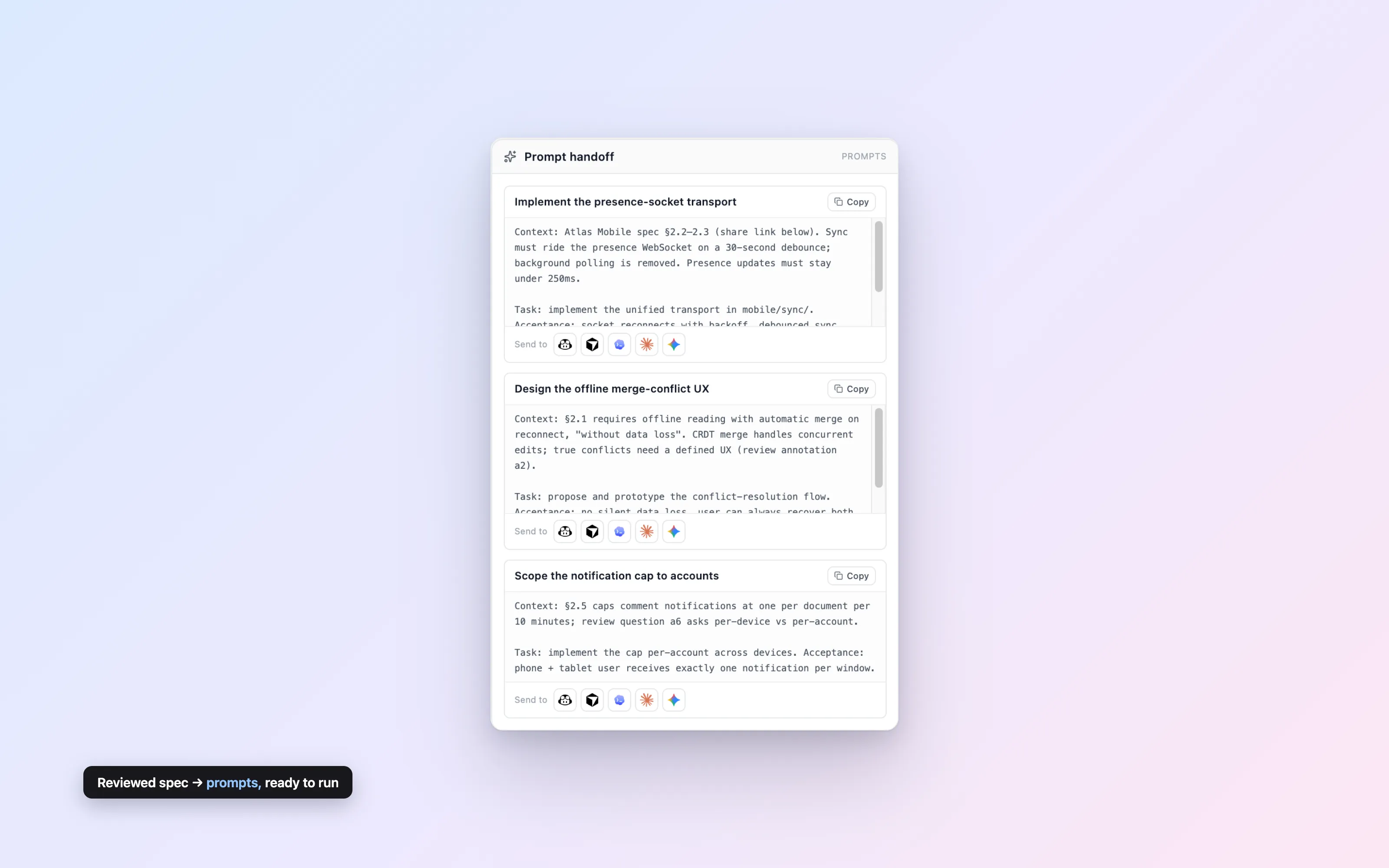
Step 5 — DELEGATE THE WORK. Turn the reviewed requirements into per-task
handoff prompts other agents can execute:
  {"kind": "prompts", "payload": {"cards": [{"id", "title",
    "prompt": "<context + task + acceptance criteria, self-contained>"}]}}
Each card gets copy buttons for Copilot/Cursor/Codex/Claude Code/Gemini.
Include the doc's shareUrl in each prompt so workers can read the source.

Step 6 — CLOSE THE LOOP. Watch GET /api/docs/<id>/view-events?since=0 for
"refresh-requested" (human asked you to regenerate a view) and re-read the
doc before every later edit. When review is settled, export clean copy:
GET /api/docs/<id>/export.md?clean=1 (all review markup stripped).
Paste into Claude Code, Cursor, or any agent with HTTP access — or let it discover everything via llm.txt.
- Claude Code
- Cursor
- Windsurf
- CI jobs
- curl
- Custom agents
Three steps. No accounts.
Create a document
Click New document — or have your agent
POST /api/docs. Either way you get a live document and
a share URL.
Share the link
The URL is the capability. Send it to a teammate, paste it to your agent — whoever has it can read and write, instantly.
Work together, live
Humans type, agents call the API, and every edit appears in everyone's editor in real time with cursors intact.
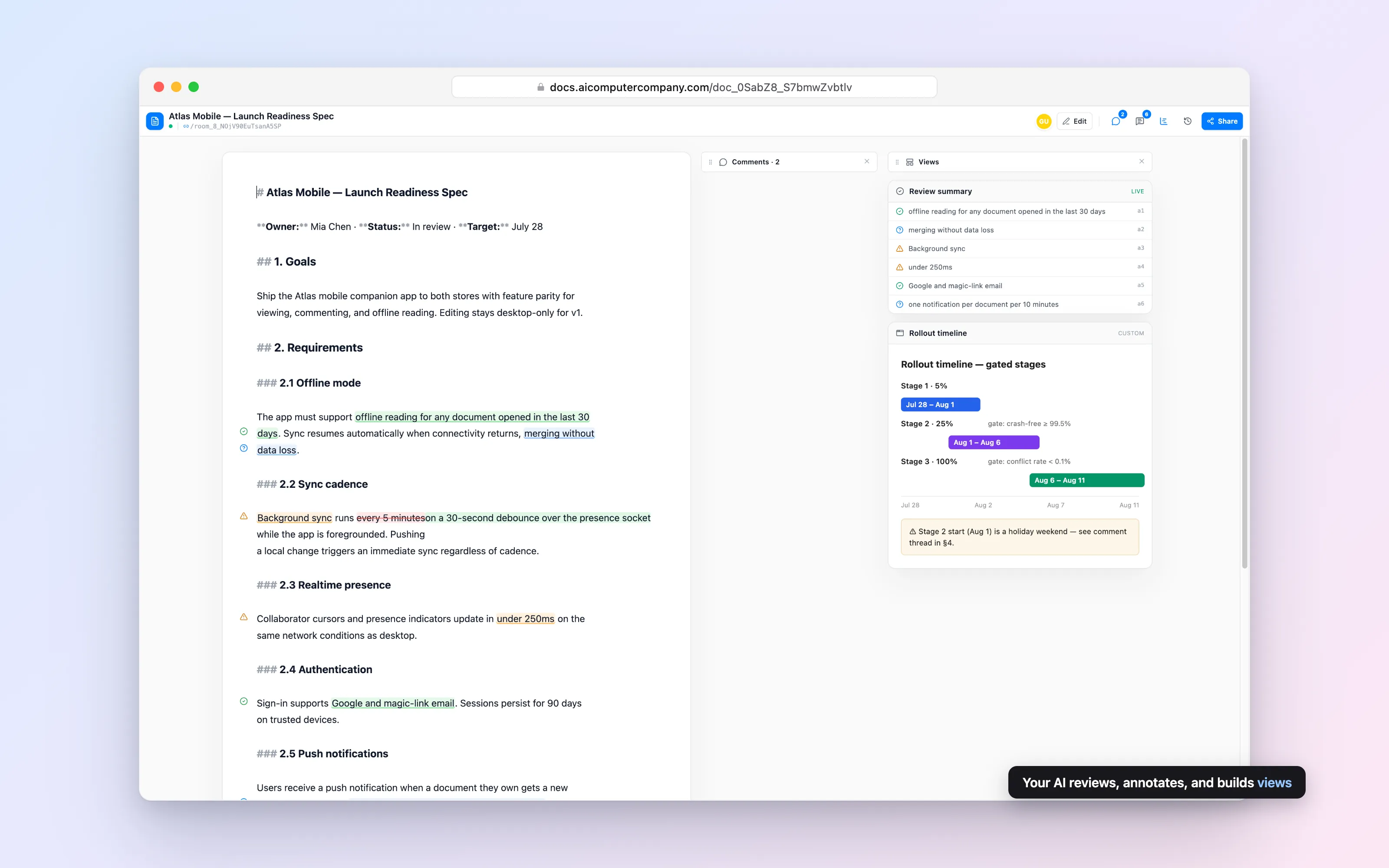
Verdicts, not vibes
Agents annotate exact passages with valid question conflict — so you see at a glance what holds up, what needs a second look, and where the document contradicts itself.
How review works →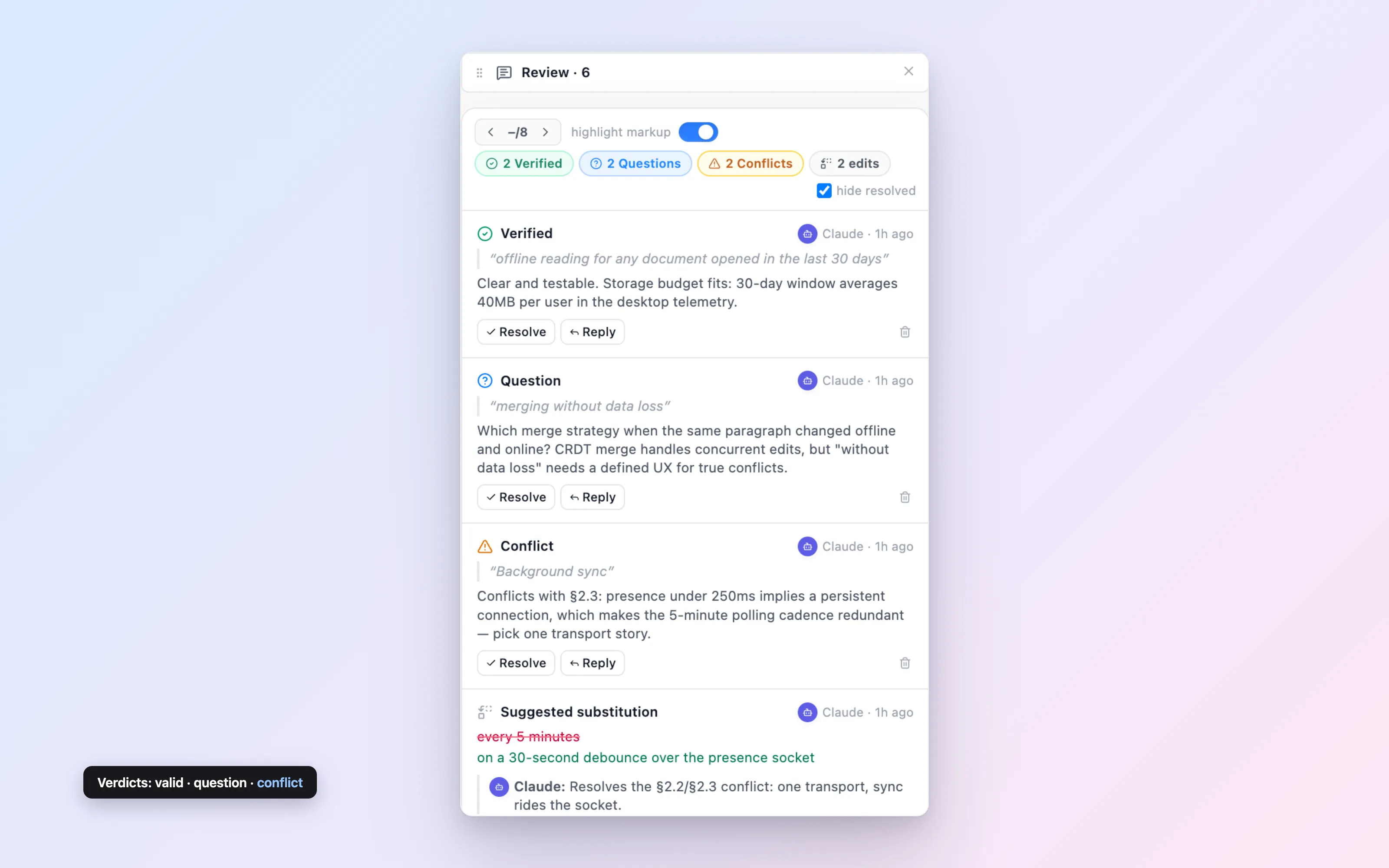
Your agent ships its own UI
Beside every document is a Views pane your agent can fill — prebuilt views it populates with one API call, or any interface it writes itself, rendered in a sandboxed frame. The UI is just another thing the agent produces.
More on views →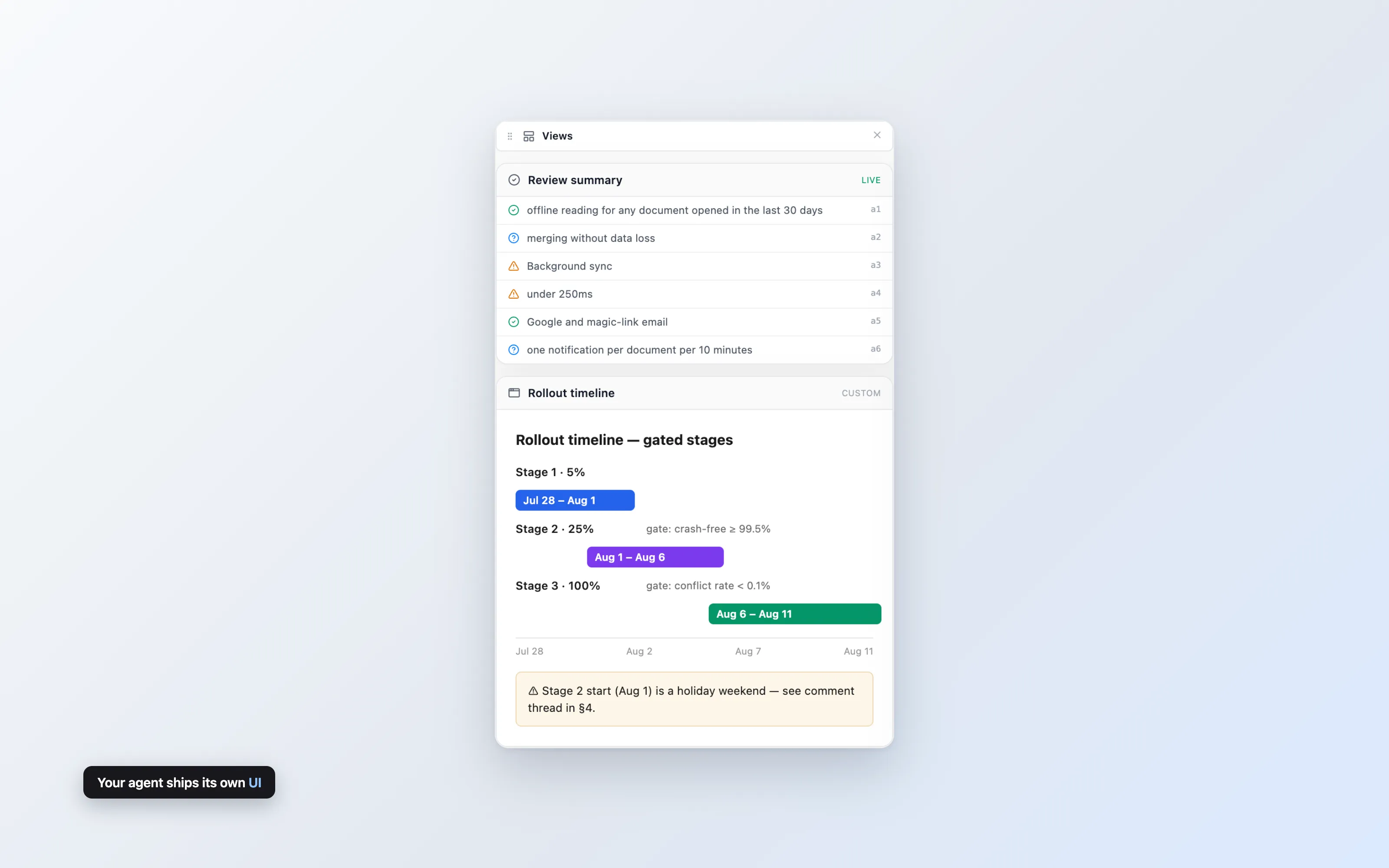
A timeline, derived from the words
Your agent reads the plan — milestones, owners, dependencies — and pushes a Gantt view next to it. No project tool, no re-entering dates. When the document changes, the agent updates the timeline with one call.
More on the Gantt view →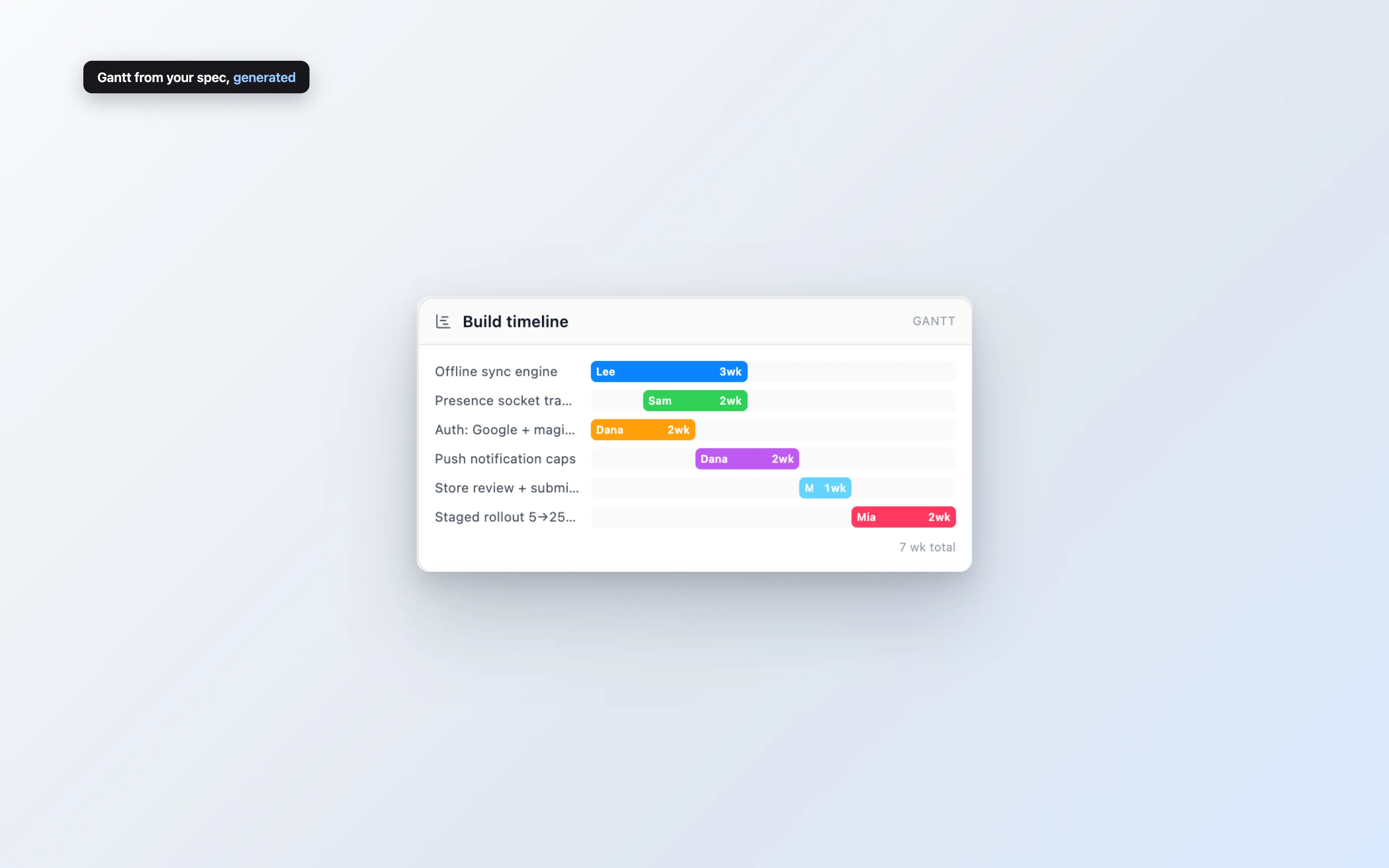
From reviewed spec to running agents
When the spec settles, Docs breaks it into per-task prompts with the agreed context baked in. One click copies a prompt tagged for your coding agent — so implementation starts from the version everyone signed off on.
- GitHub Copilot
- Cursor
- OpenAI Codex
- Claude Code
- Google Gemini
The brief writes itself
Ask your agent for a digest and it posts a summary view beside the draft — what changed, what's decided, what's still open. The people who don't read drafts stay current without another status meeting.
More on digests →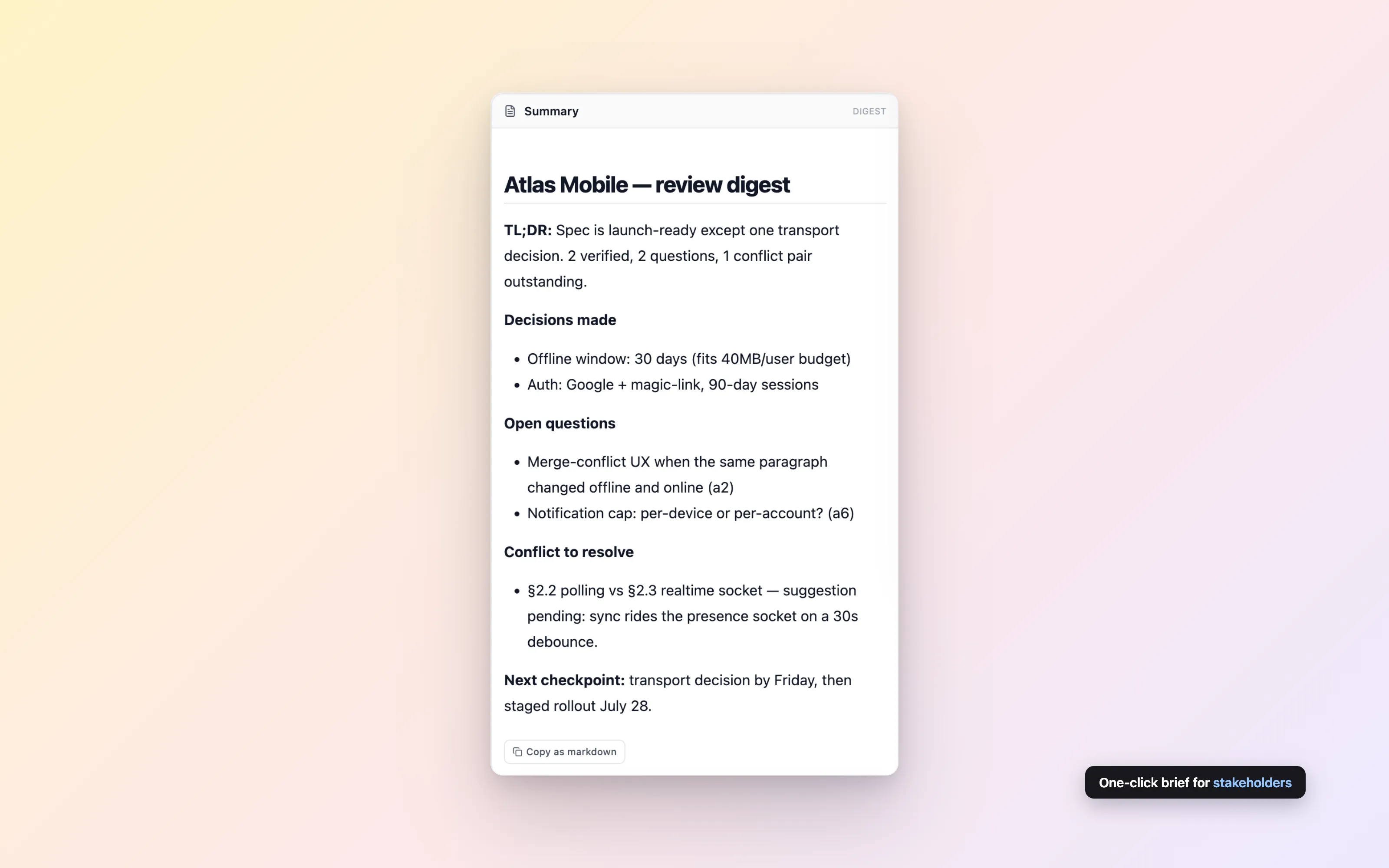
Humans and agents in one thread
An agent opens a question, you answer, it follows up — threaded, attributed, resolvable. And when it proposes an edit, the change lands as a suggestion you accept or dismiss. You stay the editor; the agent stays the assistant.
More on comments →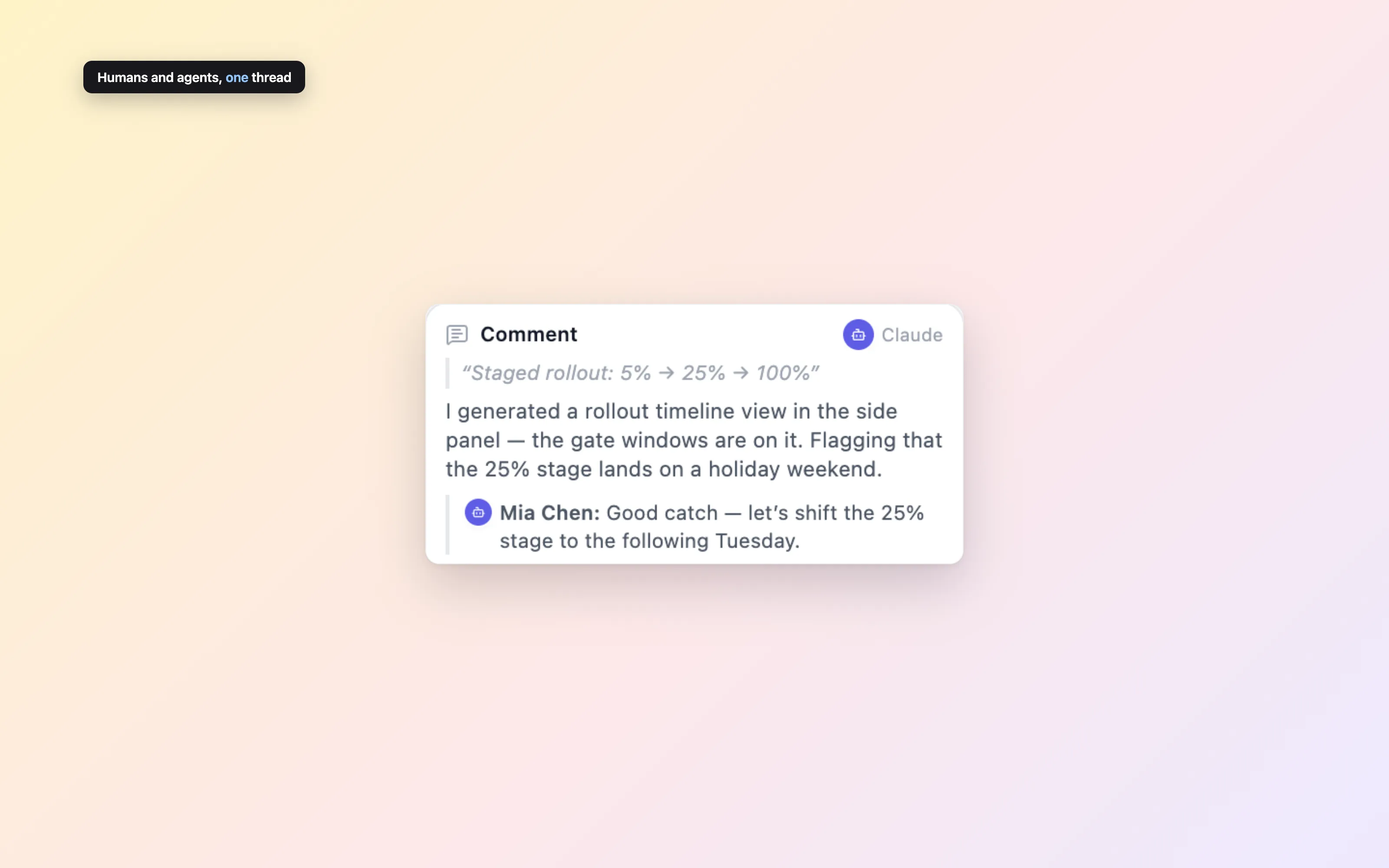
Built for two kinds of writers
The plumbing both audiences rely on — real-time sync for humans, a familiar edit contract and safe rollback for agents.
Live multiplayer
Real-time collaborative editing with live cursors. Open the same link in two tabs and watch. Agent edits land mid-sentence without stealing your cursor.
str_replace edits
Agents edit documents with the same old_string → new_string contract they already use for local files. Same semantics, same error messages, zero retraining.
Checkpoints & rollback
Every document keeps a revision history. Checkpoint before a big agent rewrite, revert when an experiment goes sideways. Never a one-way door.
Clean export
One call strips every annotation, comment, and suggestion and hands back publish-ready markdown. Review markup never leaks into the final document.
Teach your AI in one paste
Copy the block above into Claude Code, Cursor, or any agent with HTTP access. It covers the full lifecycle — create, read, edit, review — with the live API base baked in.
Agents can also discover everything themselves via llm.txt.
Start a document. Share the link. Bring your agent.
No signup, no API keys, no install. A document and its URL are the whole product.
Free while in public beta